When you build a WordPress theme that lives outside the WordPress.org repository, one thing you lose immediately is automatic updates. No update notifications, no one-click updates from the dashboard, nothing.
At first, this might seem fine. You can always upload a new ZIP manually. But once the theme is actively used, especially by clients or across multiple sites, manual updates quickly become painful and error-prone.
In this article, I’ll explain how I added automatic updates to a private WordPress theme using Yahnis Elsts’s WP Plugin Update Checker (PUC) PHP library. This setup works even if your theme is not listed on WordPress.org and gives you full control over how updates are delivered.
Why WordPress.org Is Not an Option
WordPress.org is not designed for:
- Client-only themes
- Closed-source themes
- Commercial licensing models
- Private distribution
If you want full ownership of your theme and its update pipeline, hosting updates yourself is the better option.
What Is WP Plugin Update Checker (PUC)
WP Plugin Update Checker is a PHP library created by Yahnis Elsts that integrates directly with WordPress’s update system.
Despite its name, it supports both plugins and themes.
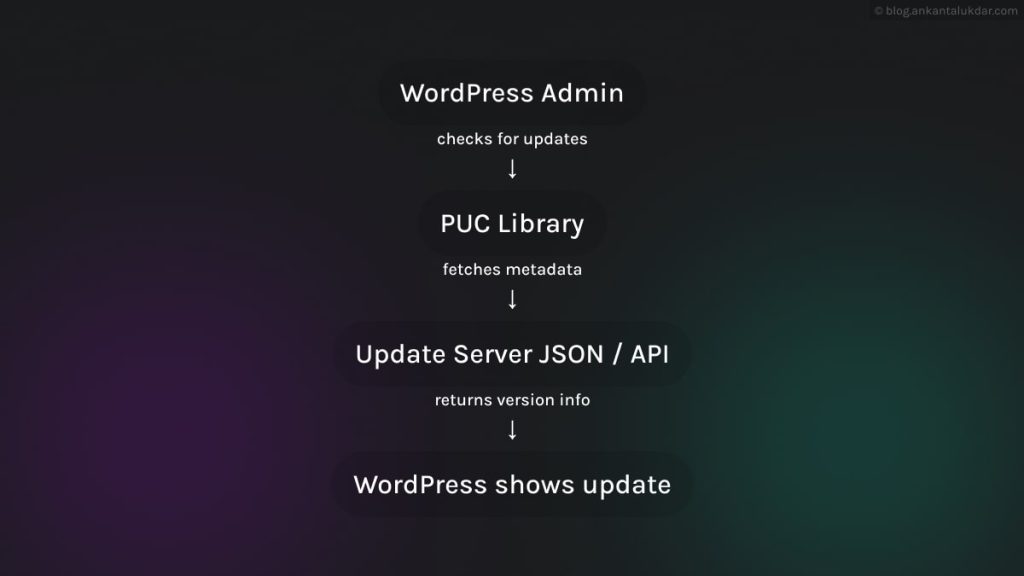
PUC works by:
- Hooking into WordPress’s update system
- Checking a remote JSON file or repository
- Comparing versions
- Showing update notices inside wp-admin
- Handling downloads automatically
Project repository:
https://github.com/YahnisElsts/plugin-update-checker
The library is free and widely used in projects.
How the Private Theme Update System Works
Step 1: Add PUC to Your Theme
Download the library and place it inside your theme directory:
/your-theme/
/vendor/plugin-update-checker/
Load it in your theme, usually in functions.php or a dedicated update file.
require get_template_directory() . '/vendor/plugin-update-checker/plugin-update-checker.php';At this point, nothing happens yet. You still need to configure it.
Step 2: Register the Theme Update Checker
Now you initialize PUC for a theme update check.
use YahnisElsts\PluginUpdateChecker\v5\PucFactory;

$updateChecker = PucFactory::buildThemeUpdateChecker(
'https://example.ankantalukdar.com/theme-update.json',
get_template_directory(),
'your-theme-slug'
);
Parameters explained:
- Update URL
Where WordPress fetches update metadata - Theme directory
Identifies which theme should be updated - Theme slug
Must match the theme folder name
Once this is active, WordPress will start checking your server for updates.
Step 3: Create the Update Metadata File
PUC expects a JSON file that describes the update. A minimal example looks like this:
{
"version": "1.1.0",
"details_url": "https://example.ankantalukdar.com/theme-changelog",
"download_url": "https://example.ankantalukdar.com/downloads/your-theme-1.1.0.zip"
}
What each field does:
- Version
Must be higher than the installed theme version - download_url
Points to a ZIP containing the updated theme - details_url
Optional but useful for changelogs
You host this file on your own server. It can be static or generated dynamically.
Step 4: Keep Theme Versions in Sync
Your theme’s version must be declared correctly in style.css.
/*
Theme Name: Your Theme
Version: 1.1.0
*/
PUC compares this value with the version in your JSON file. If the remote version is higher, WordPress shows an update notice.
Update Installation Diagram
This is what happens when the user clicks “Update”:
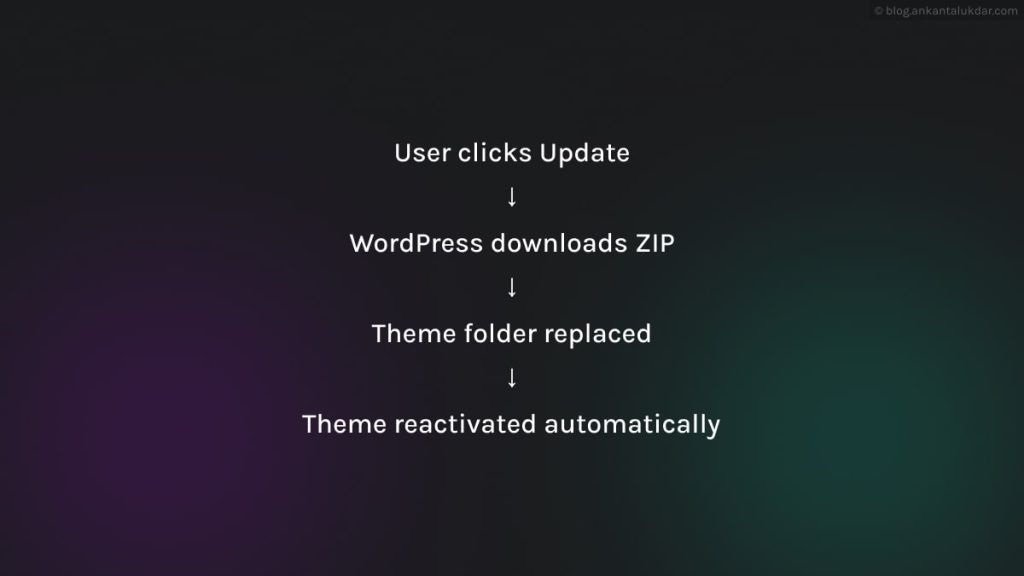
No manual steps required.
Securing a Private Theme Update System
For private or commercial themes, you usually do not want public access to update files.
Common strategies:
- Token-based download URLs
- Basic authentication
- License key validation
PUC allows you to:
- Append query parameters
- Add custom request headers
- Modify requests via filters
This makes it suitable for paid themes as well.
Using GitHub or GitLab Instead of JSON
PUC also supports:
- GitHub releases
- GitLab repositories
- Bitbucket
This works well if:
- Your theme is open source
- You already tag releases
- You want minimal infrastructure
For commercial themes, a custom update endpoint usually offers more flexibility.
Benefits of This Approach
By using PUC for private theme updates, you get:
- Native WordPress update UX
- One-click updates
- Full control over distribution
- Scalable update infrastructure
From the user’s perspective, it feels like an official theme.
Final Thoughts
Yahnis Elsts’s WP Plugin Update Checker provides a clean and reliable way to integrate with WordPress’s update system and makes this surprisingly easy.
If you’re using a different setup or have extended PUC with licensing or authentication, let me know in the comments. I’d love to hear how others are handling this.